
Finished your host registration? Your next crucial step is completing the Olamet Live face verification. This mandatory but quick process is required for all new hosts before you can start live streaming or request any withdrawals. Keep reading to learn exactly how Olamet face verification works, plus easy solutions to the most common troubleshooting problems you might run into along the way.
Olamet Live Face Verification Guide
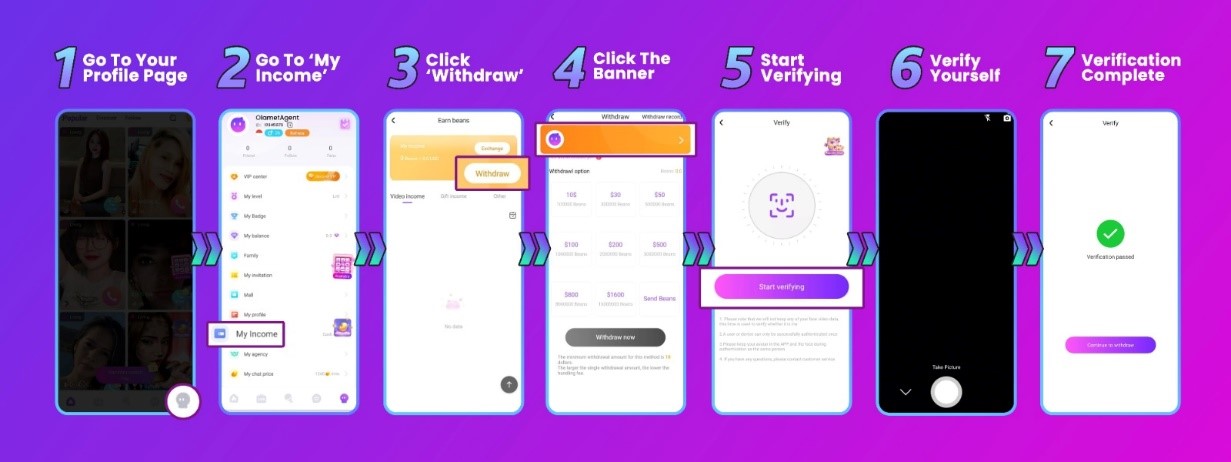
- Navigate to Your Profile Page
Open the Olamet Live app and tap your profile icon, usually located in the bottom right corner of your screen, to access your main account dashboard. - Select the ‘My Income’ Option
Scroll through your profile menu and tap on My Income. This section acts as your central hub for tracking your host earnings and managing your funds. - Access the ‘Withdraw’ Menu
Inside the income dashboard, click on the Withdraw button. Because face verification is a strict requirement for cashing out, the system will prompt you to complete it here. - Find the Verification Banner
Look closely at the top of the withdrawal page for a verification banner. Click the small arrow located in the top right corner of this banner to move forward. - Click ‘Start Verifying’
Tap the Start verifying button to activate your device’s camera and launch the facial recognition system. - Follow the On-Screen Instructions
The app will guide you through a quick live scan. You will likely be asked to center your face within a frame, blink, or nod. Make sure you are in a well-lit room without glare!
Troubleshooting Tip: If the face verification continues to fail, exit the screen and upload a clear, high-quality photo to your Olamet profile first. Once your profile picture is updated, try the live verification process again. - Verification Complete
Once the system successfully registers your scan, the process is officially finished! You are now fully verified and cleared to start live streaming and withdrawing your money.
The Sooner You Verify, the Sooner You Earn
Completing your Olamet Live face verification may seem like a minor detail, but it’s a crucial step you shouldn’t delay. Because you cannot go live or withdraw your earnings without it, getting verified immediately ensures a seamless start to your broadcasting journey. The process is incredibly fast, and by following the steps in this guide, you can easily breeze through it without a hitch.
Still have questions about the verification process or other Olamet Live features? Our dedicated support team is just a message away! Feel free to contact us directly, or explore our blog for more expert tips and account guides.

Add a Comment
You must be logged in to post a comment