
If being an on-camera host isn’t your style, you can still earn money on the platform by becoming an Olamet Live agent. Agents manage the behind-the-scenes action, focusing on recruiting hosts and building a strong broadcast team. It’s the perfect role for anyone with a talent for scouting and managing people. Ready to build your own agency? Let’s walk through the exact Olamet Live agency registration requirements to get your application started.
How to Complete Your Olamet Live Agency Registration
Ready to start building your team? Follow this step-by-step tutorial to quickly set up your Olamet Live agent account:
- Download the Olamet App
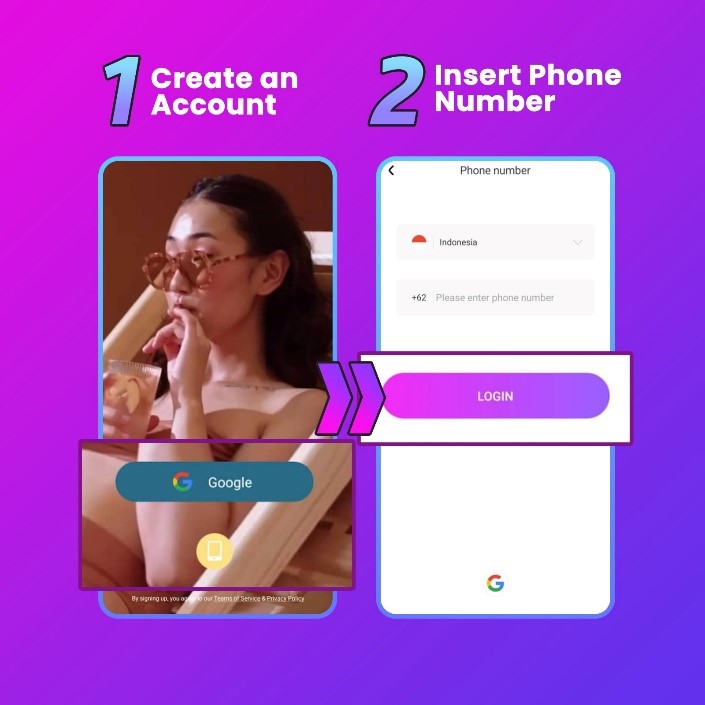
Start by downloading Olamet Live from your device’s app store, or simply use the direct download link provided on this page. Once installed, launch the app to begin. - Register via Phone Number
Tap the sign-up button to create your new account. For the easiest setup, choose the phone number registration option and enter your mobile number.
- Enter Your SMS Verification Code
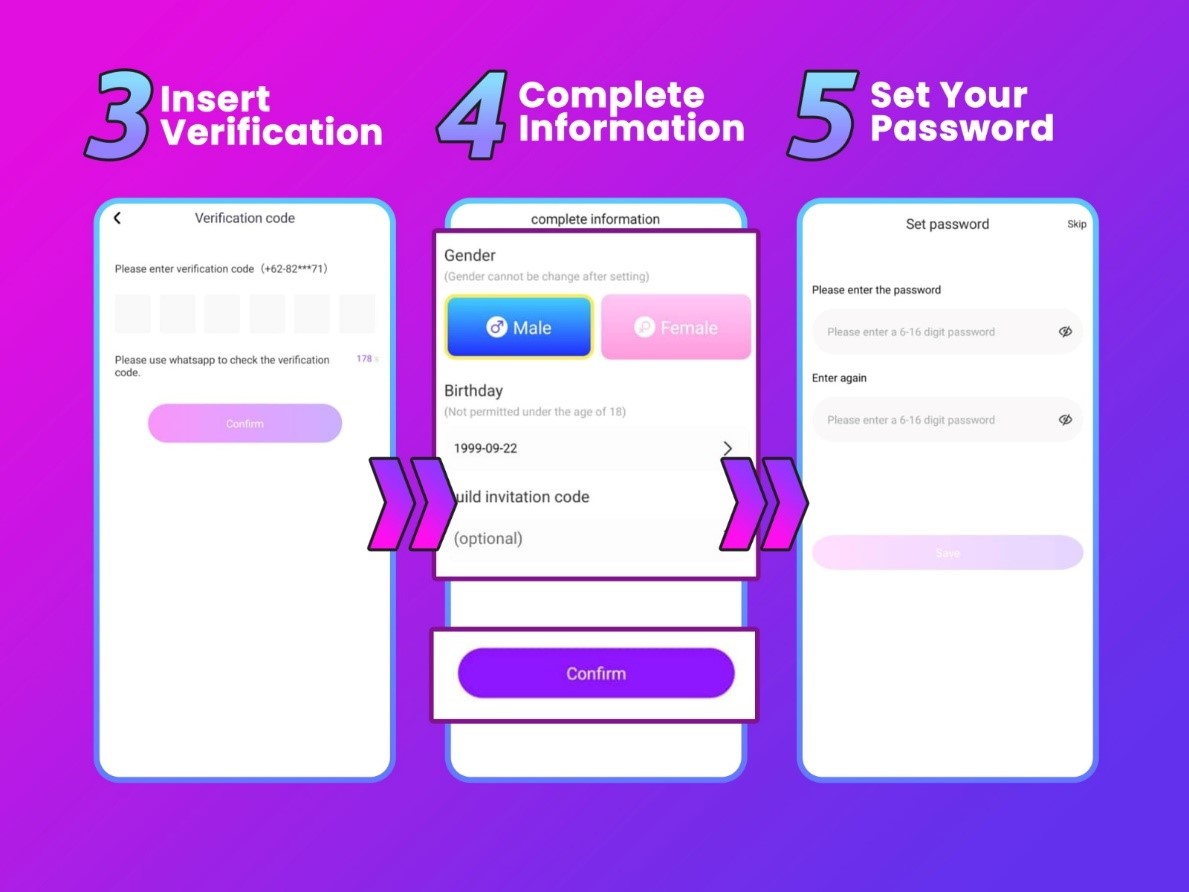
After submitting your phone number, Olamet will send a unique verification code via SMS. Check your text messages and enter this code into the app to verify your device. - Complete Your Profile & Apply the Agency Code
Fill in your basic details, including your gender and date of birth.
Crucial Step: When prompted for a guild invitation code, input 79DTZ5 exactly as shown. This code links your account directly to the agency, unlocking all exclusive host and agent benefits. - Set a Secure Password
Protect your new account by creating a strong, memorable password. Avoid simple combinations to ensure your account stays secure. Once saved, your setup is complete, and you are officially an Olamet Live agent!
Troubleshooting Your Olamet Live Agency Registration
Running into a snag while setting up your account? Here are quick fixes for the most common issues:
- Not receiving the SMS verification code: This usually happens if a phone number was entered incorrectly. Double-check your number and try again. If your information is correct but the SMS still isn’t arriving, switch to a different Wi-Fi or mobile data network, wait a moment, and request a new code.
- Registration link won’t load: Ensure you are clicking the official link provided on this page. If the page is blank or won’t open, temporarily disable any active ad blockers on your browser, or wait a few minutes and refresh the page.
Olamet Live Agent FAQ
Have a few more questions before getting started? Here is everything you need to know about managing your agency:
- What are the main benefits of being an Olamet agent? As an agent, your earning potential is completely uncapped. You generate income through commissions across multiple streams, including your hosts’ earnings, virtual gifts, and revenue from any sub-agents you manage.
- Can I operate multiple agencies? No, Olamet Live policy restricts users to owning and operating only one agency per person.
- What if I typed the wrong username during sign-up? Don’t panic! You can easily change your username at any time by navigating to your profile settings after you log in.
- What if I selected the wrong country or gender? Choose carefully! Unfortunately, these specific details cannot be changed once your registration is submitted. If you made a mistake here, you will need to create a brand-new account with the correct info.
- Are hosts allowed to transfer into my agency? Yes, but the transfer isn’t instant. The host must formally submit a request to leave their current agency and wait for official approval before they can join your roster.
- Am I allowed to live stream if I’m an agent? Absolutely! Managing a team doesn’t restrict you to behind-the-scenes work. All Olamet Live agents have full access to go live and stream whenever they want.
Completing Your Olamet Live Agency Setup
Setting up your Olamet Live agent profile really is that straightforward! With your registration complete, you can immediately dive into everything the app has to offer, from managing your new broadcasting team to unlocking new revenue streams.
Need a little extra help getting off the ground? Reach out to our support team with any questions about your new agency features, or check out our blog for the latest guides, tips, and strategies.
Add a Comment
You must be logged in to post a comment