
Live streaming on Olamet Live is one of two paths available for earning on the platform. As a host, the role is refreshingly simple: go live, build connections with new people, and collect gifts along the way, just like on any other live streaming platform out there.
Where Olamet Live truly stands out, though, is in the exclusive benefits it offers its hosts. From daily bonuses and monthly events to leaderboard ranking rewards, private call earnings, and a whole lot more, these are perks you won’t find bundled together anywhere else. Ready to jump in? Let’s start by covering the Olamet Live host registration requirements before you can join as an Olamet Live host.
Olamet Live Host Registration Tutorial
Step 1: Download the Olamet App
First, start by downloading the Olamet Live app from your device’s app store. You can use the download link provided on this page to be taken there directly. Once the installation is complete, go ahead and open the app to get started.
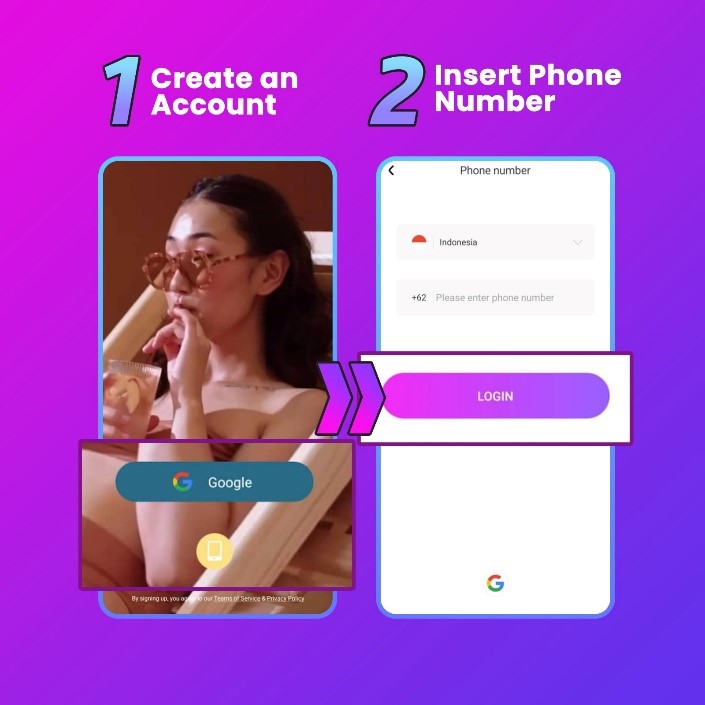
Step 2: Register Your Account
When the app opens, tap the sign-up option to begin creating your account. In this case, we’ll be walking through the registration process using a phone number, simply select that option and enter your number in the field provided.
Step 3: Insert the Verification Code
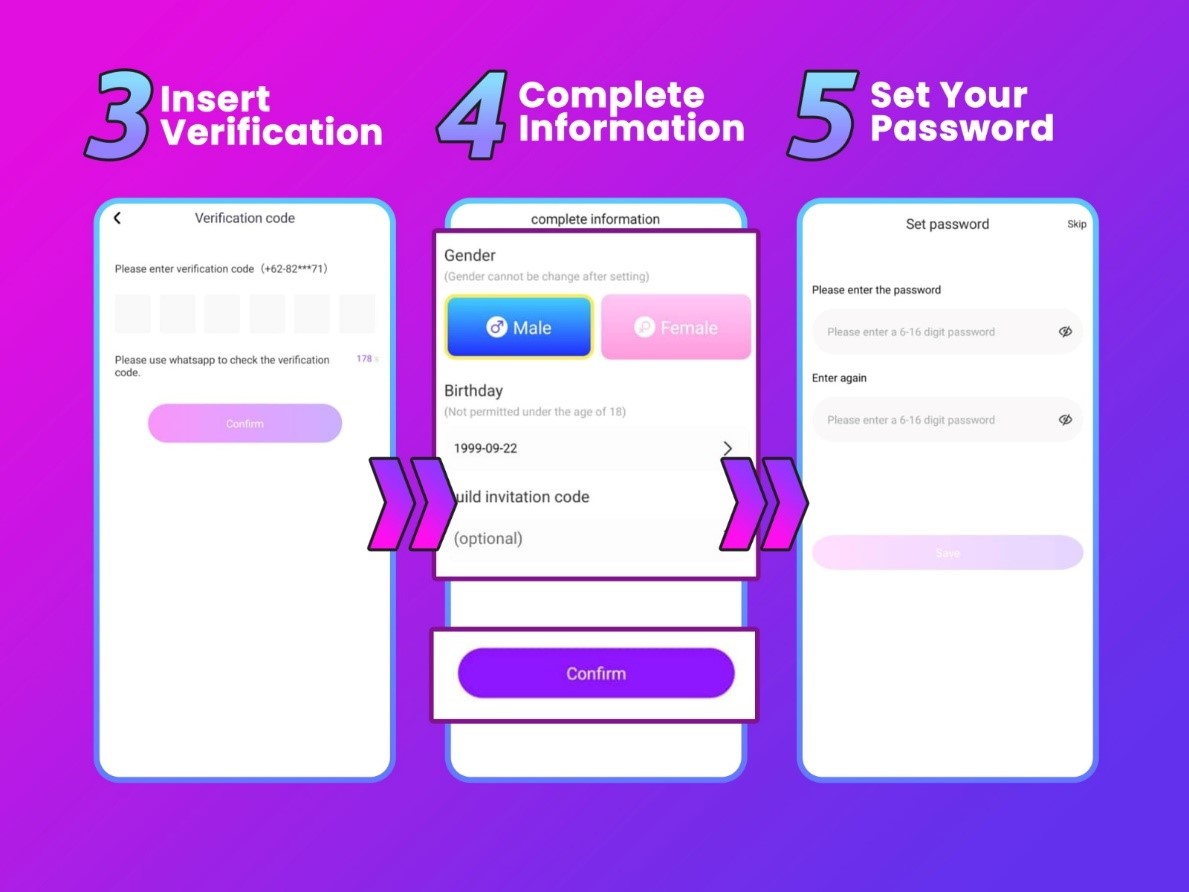
After entering your phone number, a verification code will be sent directly to your device via SMS. Check your messages, retrieve the code, and type it into the designated field to confirm your number and move on to the next step.
Step 4: Fill In the Rest of Your Information
With your number verified, you’ll be prompted to complete your profile by filling in a few additional details. Then, enter your gender and date of birth in the appropriate fields.
When you reach the guild invitation code field, make sure to enter 79DTZ5 exactly as shown, this code is what connects your account to the agency and unlocks all the exclusive host benefits that come with it.
Step 5: Set Your Password
Finally, create a secure password for your Olamet Live account. Choose something that’s strong and memorable, avoid simple or easy-to-guess combinations to keep your account protected. Once your password is set, your registration is complete and you’re officially ready to start your journey as an Olamet Live host.
Common Problems and How to Fix Them
- Selected the wrong gender or country?
Unfortunately, neither gender nor country can be edited once your account has been created. In this case, if either detail was entered incorrectly during registration, your only option is to create a brand new account with the correct information filled in from the start.
- Can’t access the registration link?
Start by making sure you’re using the correct link provided on this page. Our registration link is fully compatible with both iOS and Android devices, so if something isn’t working, the issue is most likely with the link rather than your device.
- Having trouble uploading a photo?
Your registration photo needs to be original and completely unedited, no filters, no touch-ups, no enhancements of any kind. Next, once your account is up and running, you’re welcome to update your profile picture to any photo you like, edited or otherwise.
Olamet Live Host Registration Frequently Asked Questions
- Entered the wrong username?
No problem at all, your username can be updated freely through your profile settings at any point after your account has been created.
- Can I have more than one host account on a single device?
Unfortunately no, Olamet Live restricts each device to a single registered account only.
- Is screen recording allowed on the app?
No. Olamet Live has screen recording disabled across the entire platform to safeguard the privacy of both hosts and their viewers.
Welcome to Olamet Live! Your Hosting Journey Starts Here
In conclusion, getting registered on Olamet Live is a quick, smooth, and beginner-friendly process. So, if you’ve already completed your sign-up, congratulations! You’re now an official Olamet Live host with everything the platform has to offer right at your fingertips.
Have questions about getting started, hosting features, or anything else along the way? Our team is always happy to help, reach out anytime. And don’t forget to browse our blog for more tutorials, tips, and guides designed to set you up for success on Olamet Live!
Add a Comment
You must be logged in to post a comment